

Category Mapping
Heureka categories can be configured globally for each e-shop category or individually for specific products.
Settings by Categories
Section titled “Settings by Categories”- Go to WPify → WPify Woo > XML Feed Heureka
- Scroll to the “Category mapping” section
- Select the desired languages for category selection
- Save changes
Updating Heureka Categories
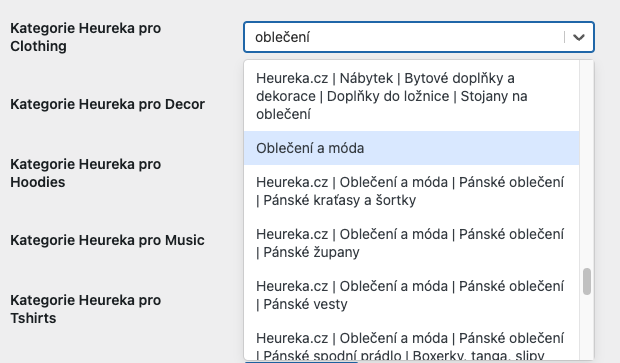
Section titled “Updating Heureka Categories”Click the “Update Heureka categories” button
Below this element, settings for all your e-shop categories will appear. When typing in the field, matching Heureka categories will be suggested.

Settings for Simple Products
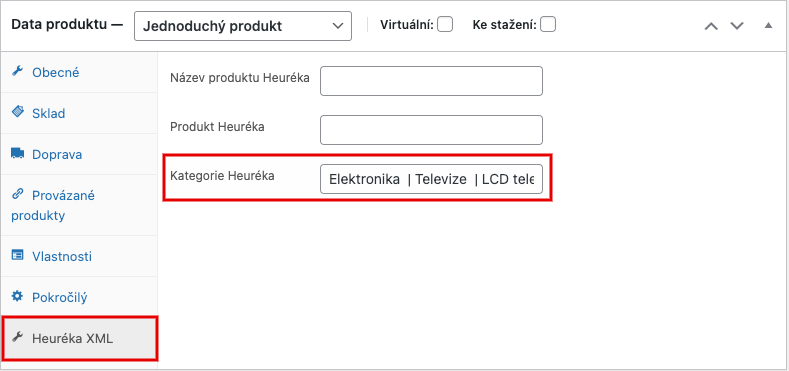
Section titled “Settings for Simple Products”- Open the detail of a specific product
- Select the “Product data” > “Heureka XML” section
- In the “Heureka Category” field, enter the full category designation according to Heureka specification

Settings for Variable Products
Section titled “Settings for Variable Products”For products with multiple variants, the category is set individually for each variant:
- Open the product detail
- Go to “Product data” > “Variations”
- Expand the specific variant
- In the “Heureka Category” field, enter the category designation