

Checkout Field Settings
The module allows detailed configuration of the display and behavior of business fields (Company ID, Tax ID, VAT ID, Company) in checkout.
Go to module settings: WPify → WPify Woo > VAT ID in Checkout
”I’m Buying as a Company” Checkbox
Section titled “”I’m Buying as a Company” Checkbox”Business fields (Company ID, Tax ID and VAT ID) can be hidden in checkout until the customer checks the checkbox.
Activation
Section titled “Activation”Enable the “Show ‘I’m buying as a company’ checkbox” option.
Custom Checkbox Text
Section titled “Custom Checkbox Text”In the “Text for ‘I’m buying as a company’ checkbox” field, you can customize the displayed text.
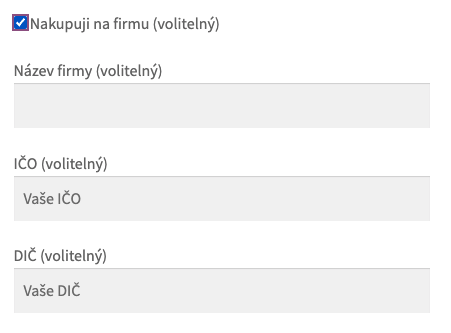
Result in Checkout
Section titled “Result in Checkout”
Moving the Company Field
Section titled “Moving the Company Field”The “Company” field (Company name) can be moved from the top of checkout to the Company ID and Tax ID fields.
Check the “Move ‘Company’ field” option.
Tax ID Field Position
Section titled “Tax ID Field Position”Move to Form Beginning
Section titled “Move to Form Beginning”The “Move Tax ID fields to form beginning” option moves Company ID and Tax ID fields before other address fields.
Half-Width Fields
Section titled “Half-Width Fields”The “Half-width Tax ID fields” option displays Company ID and Tax ID fields side by side instead of stacked.
Placeholder as Example
Section titled “Placeholder as Example”The “Change placeholder to example number” option displays an example format in Company ID and Tax ID fields instead of the field name.
Example: Instead of “Company ID” it shows “12345678”.
Field Requirements
Section titled “Field Requirements”Required Company Field
Section titled “Required Company Field”Checking “Required Company field” will require the Company name field for business purchases.
Required Company ID Field
Section titled “Required Company ID Field”In the “Required Company ID field” setting you have the following options:
| Value | Description |
|---|---|
| No | Company ID is not required |
| Yes | Company ID is always required for business purchases |
| If company is filled | Company ID is required only if customer fills the Company field |
Format Validation
Section titled “Format Validation”The “Validate Company ID/Tax ID format” option checks the correct format based on selected country:
| Country | Company ID Format | Tax ID Format |
|---|---|---|
| CZ | 8 digits | CZ + 8-10 digits |
| SK | 8 digits | SK + 10 digits |
| PL | 10 digits (NIP) | PL + 10 digits |
| HU | 8 digits | HU + 8 digits |
| DE | - | DE + 9 digits |
Saving Changes
Section titled “Saving Changes”After making all changes, save settings using the button at the bottom of the page.