

Buy X Get X (BOGO)
The “Buy X Get X” (BOGO) promotion allows customers to receive additional units of the same product free or at a discount when purchasing a certain quantity.
Classic Examples
Section titled “Classic Examples”- Buy 2, get +1 free
- Buy 3, get +2 at half price
- Buy 1, get +1 free (classic 1+1)
When to Use
Section titled “When to Use”- Clearing inventory
- Launching new products
- Seasonal promotions
- Loyalty rewards
- Competitive advantage
Step 1: Basic Settings
Section titled “Step 1: Basic Settings”- Rule type: Buy X Get X
- Application mode: Fee Based, Manual Select, or Auto Add
Step 2: Product Selection (Filters)
Section titled “Step 2: Product Selection (Filters)”Specify the products that trigger the promotion. Filters apply to both the trigger and reward (same product).
Step 3: BOGO Tiers
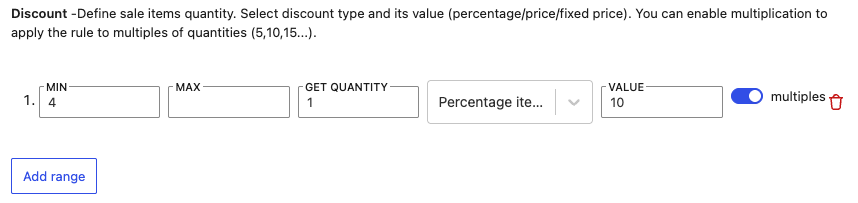
Section titled “Step 3: BOGO Tiers”- Min. quantity — how many must be purchased
- Max. quantity — upper limit (optional)
- Free quantity — how many units the customer receives
- Discount type — percentage, fixed amount, fixed price
- Value — e.g., 100 for 100% (free)
- Multiples — does the promotion repeat?
Step 4: Conditions (optional)
Section titled “Step 4: Conditions (optional)”Cart value, role, date
Step 5: Priority
Section titled “Step 5: Priority”BOGO uses the pool system — set better discounts with lower priority.
Examples
Section titled “Examples”Classic 1+1
- Min: 1, Get: 1, Discount: 100%
- Multiples: YES
- Result: 2 pcs = 1x full price + 1x free
Buy 2 get 1 at 50%
- Min: 2, Get: 1, Discount: 50%
Buy 3 get 2 free (one-time)
- Min: 3, Max: 5, Get: 2, Discount: 100%
- Multiples: NO
Tiered BOGO
- 2-3 pcs: buy 2, get 1 free
- 4-6 pcs: buy 4, get 2 free
- 7-10 pcs: buy 7, get 3 free
Calculation Logic
Section titled “Calculation Logic”Cheapest item free
- The system automatically discounts the cheapest items
Multiples vs. one-time
- With multiples: the promotion repeats
- Without multiples: one-time application
Frequently Asked Questions
Section titled “Frequently Asked Questions”What if the customer has different variations of the product?
It depends on the Count Mode setting:
- Per variant: The discount is calculated for each variation separately
- Per parent: Variations of the same product are summed together
- Match all: All products matching the filter are counted together
Can I have BOGO only on specific variations?
Yes! In the filter settings, select specific variations, or set the entire product and exclude variations that should not be included.