

Bulk Discounts
Bulk discounts enable progressive discounts based on the quantity of products in the cart — the more the customer buys, the more they save.
When to Use
Section titled “When to Use”- Encouraging larger volume purchases
- Wholesale offers for B2B customers
- Inventory clearance sales
- Seasonal promotions with combined variations
How It Works
Section titled “How It Works”The system works based on tiers (ranges):
- Minimum and maximum quantity
- Discount type (percentage or fixed)
- Discount value
Step 1: Basic Settings
Section titled “Step 1: Basic Settings”Create a rule of the Bulk Discount type
Step 2: Product Selection (Filters)
Section titled “Step 2: Product Selection (Filters)”Specify target products or categories (include/exclude)
Step 3: Count Mode
Section titled “Step 3: Count Mode”- Per variant — each variation counted separately
- Per parent — all variations of the same product counted together
- Match all — all products matching the filter counted together
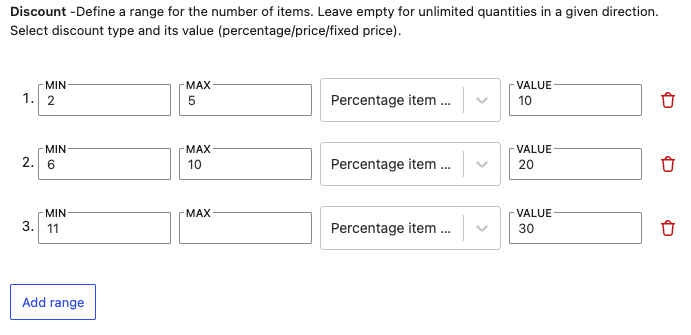
Step 4: Discount Tiers
Section titled “Step 4: Discount Tiers”Example: 2-5 pcs = 10%, 6-10 pcs = 20%, 11+ pcs = 30%
Step 5: Conditions (optional)
Section titled “Step 5: Conditions (optional)”Cart value, date, user role
Examples
Section titled “Examples”Simple discount
- 2-4 pcs = 10%
- 5-9 pcs = 15%
- 10+ pcs = 25%
By category
- Discount on all sock variations combined
Fixed wholesale discount
- 10-29 pcs = $2/pc off
- 30-49 pcs = $4/pc off
Display
Section titled “Display”The plugin automatically displays a pricing table on the product page with an overview of quantities, discounts, and prices.

Frequently Asked Questions
Section titled “Frequently Asked Questions”Is the quantity counted per variation or combined?
It depends on the Count Mode setting:
- Per variant (default): Each variation is counted separately. Example: 2x T-shirt red M is evaluated separately from 3x T-shirt blue L.
- Per parent: All variations of the same product are summed together. Example: 2x red M + 3x blue L = 5 pcs total.
- Match all: All products matching the filter are counted together. Example: 2x T-shirt + 3x hoodie (both in the “Clothing” category) = 5 pcs total.
Can I have different bulk discounts for different products?
Yes! You can create multiple rules with different filters. The plugin automatically finds the correct bulk tier for each product.
Can the customer see the pricing table before adding to cart?
Yes! The plugin automatically displays a pricing table on the product page (if a position is set for the info block display).