

Actions
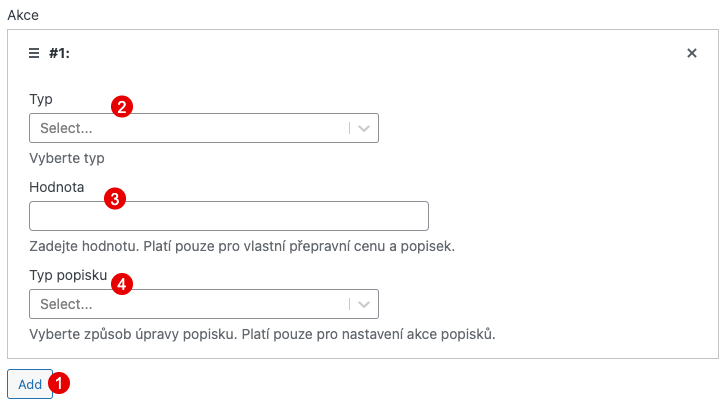
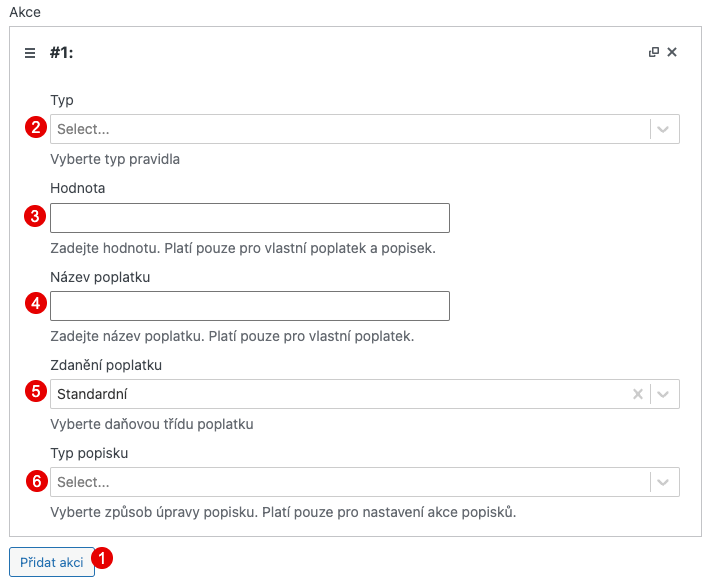
Actions determine what happens when all conditions in a rule group are met. Click Add in the actions section to add a new action. You can add multiple actions per rule group.
Shipping Actions
Section titled “Shipping Actions”Available when creating shipping rules.
Set Shipping Price
Section titled “Set Shipping Price”Changes the price of the selected shipping method either to a fixed value or by multiplying its original base price.
| Field | Description |
|---|---|
| Price type | Choose whether the entered value is a fixed shipping price or a multiplier of the original shipping price |
| Value | Fixed price amount (e.g., 99.90) or multiplier (e.g., 2 doubles the original shipping price) |
Set Free Shipping
Section titled “Set Free Shipping”Sets the shipping method price to 0. No additional configuration needed.
Hide Shipping Method
Section titled “Hide Shipping Method”Removes the shipping method from the checkout. The customer will not see it. No additional configuration needed.
Set Label
Section titled “Set Label”Modifies the label (name) of the shipping method displayed to the customer.
| Field | Description |
|---|---|
| Value | The text to use for the label modification |
| Label type | How the label is modified (see below) |
Label type options:
| Option | Description |
|---|---|
| Replace label | Completely replaces the original label with the new text |
| Append to original label | Adds the new text after the original label |
| Prepend to original label | Adds the new text before the original label |
Payment Actions
Section titled “Payment Actions”Available when creating payment rules.
Add Fixed Fee
Section titled “Add Fixed Fee”Adds a fixed monetary fee to the order when the selected payment gateway is used.
| Field | Description |
|---|---|
| Value | Fee amount excluding VAT (enter with decimal point) |
| Fee label | Name of the fee displayed in checkout and on the order |
| Tax of fee | VAT rate applied to the fee (select from available tax classes, or “Not taxable”) |
Add Percentage Fee from Cart Subtotal
Section titled “Add Percentage Fee from Cart Subtotal”Adds a fee calculated as a percentage of the cart subtotal.
| Field | Description |
|---|---|
| Value | Percentage of the cart subtotal (e.g., 2 for 2%) |
| Fee label | Name of the fee displayed in checkout and on the order |
| Tax of fee | VAT rate applied to the fee |
Remove Method
Section titled “Remove Method”Hides the payment gateway from the checkout. No additional configuration needed.
Disable Method
Section titled “Disable Method”Keeps the payment gateway visible but prevents customers from selecting or using it. The checkout adds the wpify-woo-conditional-shipping-payment-method--disabled class to its wrapper so it can be styled in your theme. The selected payment method is rechecked during checkout validation, so submitting a disabled gateway is always rejected.
If a rule both removes and disables a gateway, removal takes precedence.
Set Label
Section titled “Set Label”Modifies the label of the payment gateway.
| Field | Description |
|---|---|
| Value | The text to use for the label modification |
| Label type | Replace label / Append to original label / Prepend to original label |
Combining Actions
Section titled “Combining Actions”You can add multiple actions to a single rule group. Actions are applied in order. For example:
- Set a shipping price and modify the label
- Add a fee and modify the payment method label
- Combine free shipping with a label change (e.g., “Free shipping for orders over 1000 CZK”)
Actions can be deleted by clicking the X in the top right corner of each action.