

API Settings
API settings connect the plugin to your ThePay 2.0 merchant account. You can find them at WPify → ThePay.
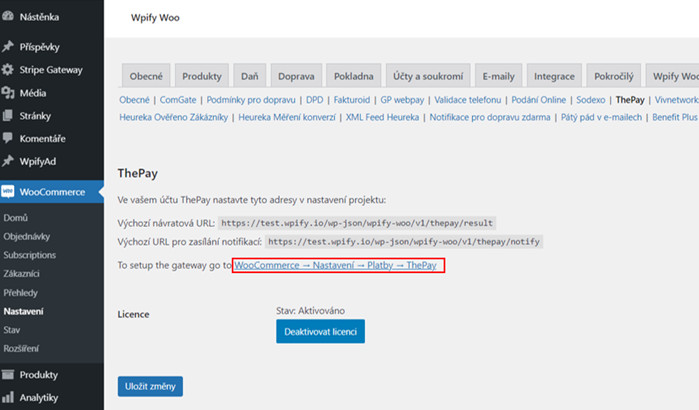
License
Section titled “License”Enter your license key to activate the plugin and receive updates.
Environment
Section titled “Environment”| Option | Description |
|---|---|
| Test | Sandbox mode for testing payments without real transactions |
| Production | Live mode for processing real payments |
API Credentials
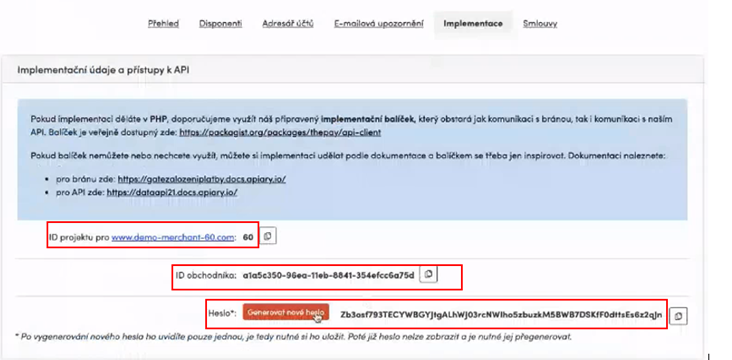
Section titled “API Credentials”You can find these credentials in your ThePay administration panel under the Implementation section.
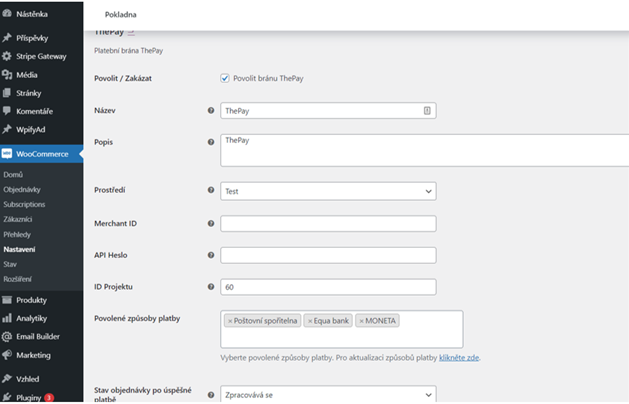
| Field | Description |
|---|---|
| Merchant ID | Your unique merchant identifier provided by ThePay |
| API Password | Password for API authentication |
| Project ID | Identifier of your ThePay project |
Where to Find Credentials
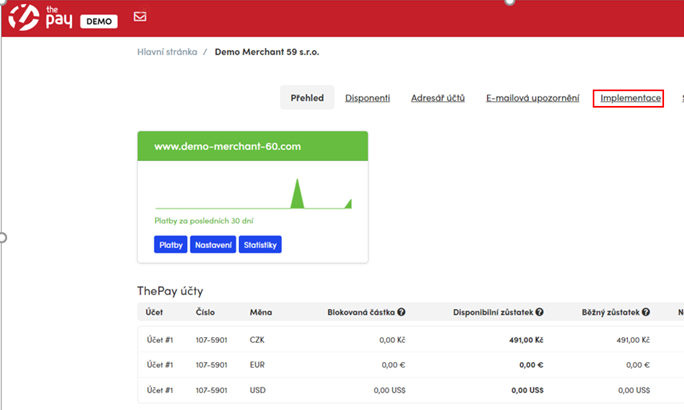
Section titled “Where to Find Credentials”- Log in to the ThePay administration
- Navigate to the Implementation section
- Copy the Project ID, Merchant ID, and API Password
- Paste them into the corresponding fields in the plugin settings
Testing the Connection
Section titled “Testing the Connection”After entering the credentials:
- Make sure the Environment is set to Test
- Save the settings
- Go to WooCommerce → Settings → Payments and enable the ThePay gateway
- Place a test order to verify the payment flow works correctly
- After successful testing, switch the Environment to Production and update credentials with production values