

Voucher Products
For the plugin to work, you need to create WooCommerce products configured as vouchers.
Creating a Voucher Product
Section titled “Creating a Voucher Product”- Go to Products → Add New
- Enter the product name (e.g., “Gift Voucher 500 CZK”)
- Add description, images, and other product information
- Check the Virtual checkbox — vouchers don’t need shipping
Simple vs. Variable Products
Section titled “Simple vs. Variable Products”- Simple product — set a specific price matching the voucher value (e.g., 500 CZK)
- Variable product — create variants with different prices for multiple denominations (e.g., 500 CZK, 1000 CZK, 2000 CZK)
Product Vouchers Tab
Section titled “Product Vouchers Tab”Each product has a Product Vouchers tab in the product editor with voucher-specific settings.

Template Selection
Section titled “Template Selection”| Field | Description |
|---|---|
| Enable template selection | When enabled, customers receive a link to choose their voucher template and download it. When disabled, the voucher is sent only as an email attachment. |
| Allowed templates | Select which templates are available for this product. Multiple templates allow customer choice. |
Coupon Configuration
Section titled “Coupon Configuration”Click Add to configure coupon generation:
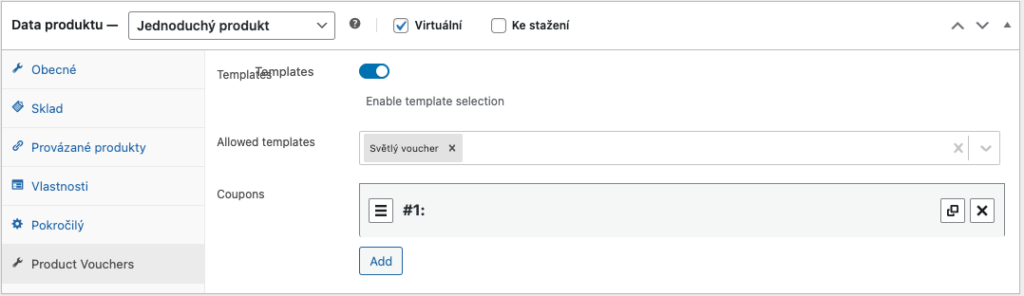
| Field | Description | Default |
|---|---|---|
| Enabled | Toggle coupon generation on/off | — |
| Valid for days | Number of days the coupon remains valid from the generation date | 365 |
| Usage limit | Maximum number of times the coupon can be used | 1 |
How It Works
Section titled “How It Works”- Customer purchases a voucher product
- When the order reaches the configured status, a coupon code is generated
- A voucher image is created from the template with the coupon code, value, and dates
- The voucher is delivered to the customer via email attachment and/or download link
- The customer uses the coupon code at checkout to apply the discount