

Admin Interface Overview
After installing and activating the plugin, new elements are added to the WooCommerce administration for managing DPD shipments.
Orders List
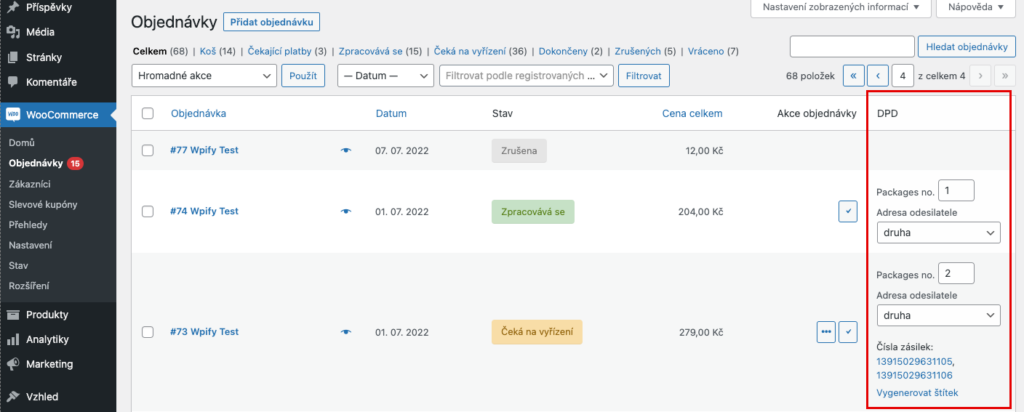
Section titled “Orders List”A new DPD column is added to the orders overview, where you can:
- Set the number of packages (Packages no.) for the shipment
- Select the sender address (if you have multiple addresses)
- View shipment numbers as clickable tracking links after submission to DPD
- Click Generate label to download the shipping label
Bulk Actions
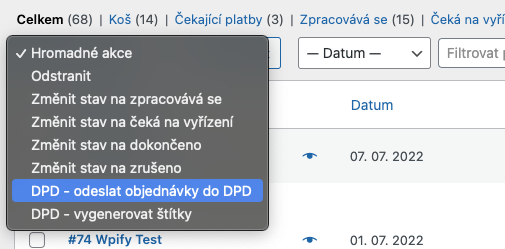
Section titled “Bulk Actions”Two new actions are available in the Bulk actions dropdown:
- DPD - submit orders to DPD — bulk submit selected orders to DPD
- DPD - generate labels — download a single PDF/ZPL file with labels for all selected orders
Order Detail
Section titled “Order Detail”A new DPD metabox appears in the order detail, allowing you to:
- Set the number of packages for the shipment
- Select the sender address (if you have multiple addresses)
- Click Submit to DPD to create the shipment
- After submission, view the DPD Shipment ID and parcel numbers as tracking links
- Click Generate label to download the shipping label
All actions and processes related to DPD shipments are logged in the order notes, giving you a complete overview of all events.